
Cookie Consent: How It Works (And Why It Matters for Your Website)
If you've visited a website recently, you've almost certainly seen a cookie consent banner. Maybe you clicked "Accept All" without thinking twice. Maybe you've wondered what those options actually mean — or why they're there in the first place.
For visitors, it's a quick pop-up. For website owners, it's a critical piece of infrastructure. Cookie consent is how businesses demonstrate respect for visitor privacy, stay compliant with global regulations, and build the kind of trust that turns first-time visitors into long-term customers.
Here's a clear breakdown of how the cookie consent process works — and what each option means for the people clicking through.
Why Cookie Consent Exists
Cookie consent isn't a design trend. It's a legal requirement in many parts of the world.
Regulations like the General Data Protection Regulation (GDPR) in Europe and the California Consumer Privacy Act (CCPA) in the United States require websites to get explicit permission before placing non-essential tracking technologies on a visitor's device. That includes:
Analytics cookies that measure behavior
Advertising cookies that power retargeting campaigns
Personalization cookies that remember preferences across sessions
The core idea: people have a right to know what data is being collected about them — and a right to say no.
For businesses, getting this wrong isn't just a reputational risk. GDPR violations alone can result in fines up to €20 million or 4% of global annual revenue. Compliance isn't optional; it's foundational.
The Consent Journey: What Happens When Someone Visits Your Site
Step 1: The Visitor Arrives — Tracking Is Paused
When someone lands on your website for the first time, non-essential cookies don't fire automatically. Tracking stays paused while the site waits for the visitor to make a choice.
This is by design. A privacy-first setup means that analytics tools, ad pixels, and third-party scripts hold off until consent is given. Essential cookies — the ones that keep your site functioning, like session management or shopping cart memory — remain active because they're necessary for basic operation.
Step 2: The Consent Banner Appears
Within moments, a consent banner appears on the page. This is the visitor's opportunity to decide how they want to interact with the site's data practices.
The banner typically presents a few clear options:
Accept everything
Reject optional cookies
Customize preferences
Visit the preference
Most well-designed banners explain — in plain language — what each choice means.
A good consent banner isn't a dark pattern designed to confuse or coerce. It's a straightforward prompt that respects the visitor's intelligence and their right to choose.
Step 3: Preferences Are Applied
Once the visitor makes their choice, the website responds immediately. Only the cookie categories the visitor approved are activated. If someone rejects optional cookies, ad pixels and analytics scripts stay dormant. If they accept all, the full suite of tracking tools comes online.
Those preferences are saved — typically in a first-party cookie — so the visitor isn't prompted again on every page or every visit.
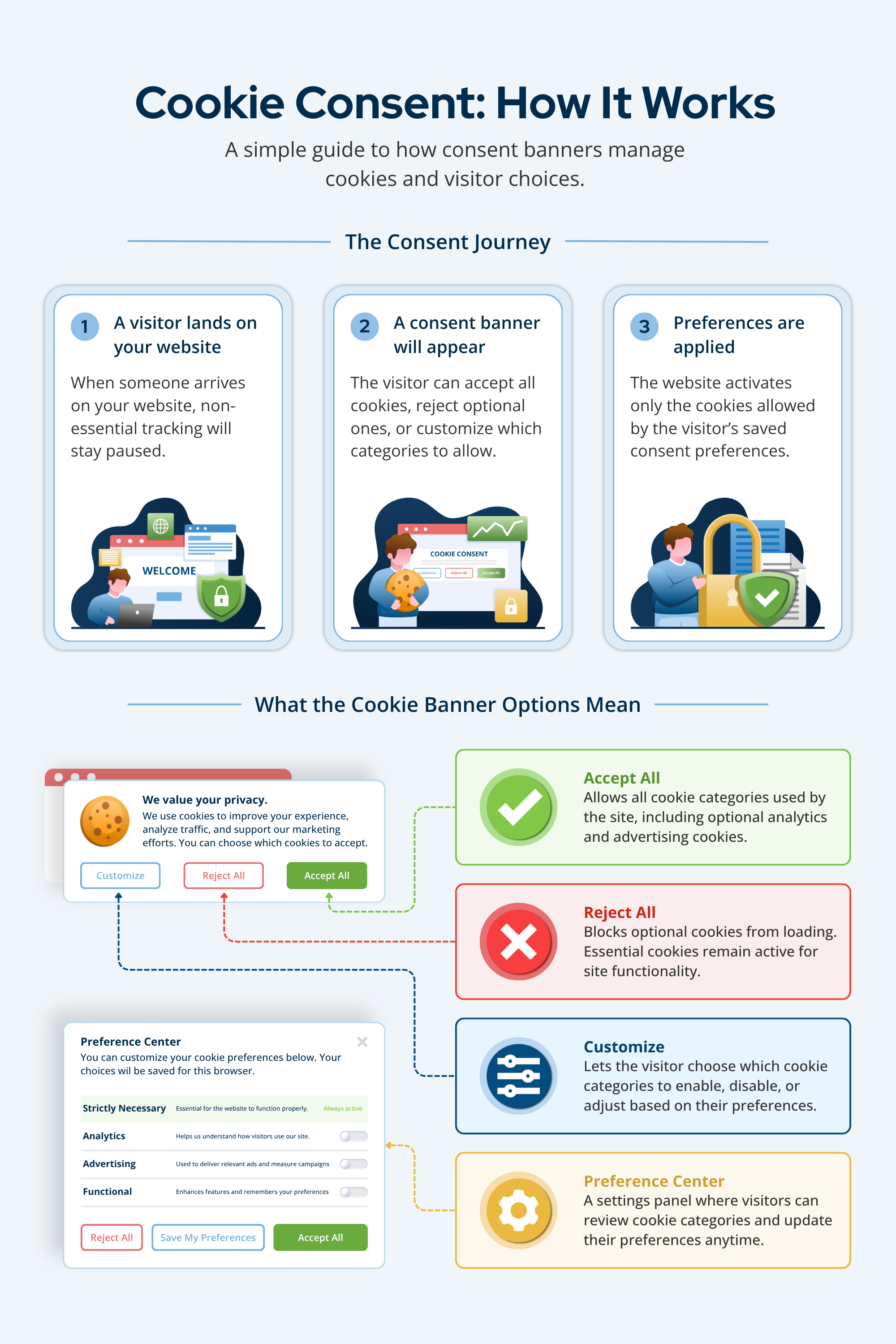
What the Cookie Banner Options Actually Mean
Accept All
Selecting "Accept All" grants permission for every cookie category the site uses — including optional ones like analytics, advertising, and personalization. It's the broadest consent option and gives the site the most complete picture of visitor behavior.
If you are using the Franchise Ninja platform, “Accepting All” provides the consent needed for our tracking script to run.
Reject All
Choosing "Reject All" blocks optional cookies entirely. Essential cookies remain active because the site genuinely can't function without them. Visitors choosing this option can still browse the site normally — they simply won't be tracked for advertising or analytics purposes.
Customize
The "Customize" option lets visitors make granular decisions. Rather than an all-or-nothing choice, they can toggle individual cookie categories on or off. Someone might allow analytics cookies for site improvement purposes while blocking advertising cookies entirely. This is the middle path — and increasingly, it's what privacy-conscious users prefer.
Preference Center
The Preference Center is a dedicated settings panel that visitors can return to at any time. It's where cookie categories are explained in more detail, current consent status is displayed, and preferences can be updated or withdrawn.
Offering an accessible Preference Center isn't just good compliance practice. It signals that your business takes privacy seriously beyond the initial banner interaction.
Why This Matters for Website Owners and Marketers
Proper cookie consent management does more than keep you out of legal trouble.
It builds trust. Visitors who feel in control of their data are more likely to engage, convert, and return. Transparency is a competitive differentiator, especially in markets where consumers are increasingly privacy-aware.
It improves data quality. Consented data is cleaner, more reliable data. Analytics built on opted-in users gives you a more accurate read on behavior than data collected without clear permission.
It future-proofs your marketing. With third-party cookies being phased out across major browsers, consent-based first-party data is becoming the foundation of effective digital marketing. Building good consent practices now positions your business well for where the industry is heading.
Start with Transparency
Cookie consent doesn't have to be complicated — but it does have to be intentional. A clear banner, honest options, and a functioning preference center are the building blocks of a privacy-respecting website.
For visitors, it's a few seconds and a click. For your business, it's the foundation of a trustworthy digital presence. Get the basics right, and you're not just checking a compliance box — you're showing customers that their privacy is something you genuinely care about.
